
Legal Document Assistants and Preparers: Tools, Integrations, and Professional Associations


A legal document assistant’s craft is preparing the right documents, correctly, at the client’s direction — the uncontested divorce packet for that county, the trust set, the probate petition — without ever crossing into legal advice. The selection is governed by the practice area, the jurisdiction, and the client’s own answers. That is exactly the kind of work a deterministic, rule-based document engine is built to support.

DocupletionForms lets an LDA or legal document preparer build their own intake-and-document system: the practitioner encodes their templates and rules, the client answers an intake, and the engine merges the data into the correct forms. The same inputs always produce the same documents — no AI deciding anything, no advice rendered. This guide lays out the options: how the engine fits the profession, the platforms it can exchange with, and the associations that support the field.

A note on scope. An LDA or LDP prepares documents at the client’s direction and does not give legal advice or select a legal course of action for the client. DocupletionForms is a document-preparation tool: its conditional logic is the practitioner’s own clerical rule set, driven by the client’s answers — not legal advice, and not an AI making decisions. The connections described below are suggested integration patterns built on DocupletionForms’ live webhooks, Salesforce add-on, and Zapier support. Practitioners remain responsible for their own registration, bonding, and compliance under the law of their state.

The shape of an LDA document workflow

Every pattern here follows the same spine. The client’s answers arrive through an intake form. The practitioner’s rules decide which forms the matter needs for that practice area and jurisdiction. The data is merged into the correct court and county forms. The finished set goes out for signature, filing, or delivery, and a copy lands in the practice’s records. The deterministic middle is what keeps every packet consistent — and keeps the work squarely on the clerical, document-preparation side of the line.

Client intake (the client’s direction)
rule-based form selection
merge into court & county forms
e-sign or e-file
deliver and archive

The associations and bodies that support the profession

The legal document assistant and legal document preparer field is organized state by state, with a handful of associations and regulators carrying the profession forward. If you work in or are entering the field, these are worth knowing:

Many LDAs and LDPs come from a paralegal background and also belong to broader legal-support associations. These are paralegal bodies rather than LDA-specific, but they are part of the same professional world:

The profession is governed at the state level — for example, California’s Business and Professions Code section 6400 et seq. for registered LDAs, Arizona’s Supreme Court certification for LDPs, and Nevada’s document-preparation-service registration. Broader limited-license programs, such as Utah’s Licensed Paralegal Practitioner and Oregon’s licensed paralegal, are expanding the wider movement. Check your own state’s rules.

What the engine can produce

DocupletionForms merges the client’s answers into the required court and county forms and the practitioner’s own templates — selecting the correct set for the matter and jurisdiction. Court forms are generally public government forms, so the engine populates the actual filings a self-represented client needs. At the client’s direction, a single intake can produce:

  • Family-law packets — uncontested dissolution, parentage, custody and support, by county
  • Estate-planning documents — wills, living trusts, powers of attorney, advance directives
  • Probate, guardianship, and conservatorship filings, including small-estate affidavits
  • Business-formation packages — LLC and incorporation filings and operating agreements
  • Real-property documents — grant and quitclaim deeds and transfer forms
  • Name-change and small-claims paperwork
  • The client engagement letter and the required practitioner disclosures
  • Cover letters, filing instructions, and the complete client packet

The platforms an LDA practice connects to

An LDA tech stack is usually lighter than a law firm’s, built from intake, court filing, payments, and signing. DocupletionForms is the document layer in the middle; the rest connect around it via webhooks, API, or Zapier, with the usual data-versus-PDF distinction.

  • Court e-filing — InfoTrack, One Legal. Where the prepared filing is submitted to the court at the client’s direction; both serve self-represented filings and integrate widely.
  • Process serving — ServeManager. Many LDAs also handle service of process; ServeManager’s Zapier app and API make it an easy exchange point.
  • Payments and bookkeeping — QuickBooks, Stripe. Flat-fee billing and retainer collection for the engagement.
  • Scheduling and signing — Calendly, DocuSign. Consultations and client signatures on the finished documents.
  • CRM and records — Salesforce, HubSpot, and storage in Dropbox, Google Drive, or Box. The client record and the archived packet.

For the file itself, the reliable pattern is to generate the PDF, place it in a connected store, and either link it on the client record or push it through the platform’s API. Do not assume a one-click “attach PDF” action exists everywhere; it does not.

Connection patterns to choose from

1. Intake-first

The client completes a DocupletionForms intake; the practitioner’s rules select and populate the forms; the packet returns for review before anything is filed or signed. The simplest and most common pattern for a solo practice.

2. Zapier or webhook

A new intake or payment triggers generation, and Webhooks by Zapier route data to scheduling, e-signing, or e-filing tools — no code required.

3. Generate, then e-file

DocupletionForms produces the court-ready forms; the filing is submitted through an e-filing provider for that court, at the client’s direction. Keeps preparation and submission cleanly separated.

4. Review gate

A required checkpoint where the practitioner confirms the jurisdiction and the client’s answers before generation — ensuring the right county forms and keeping the practitioner, not the software, in control of the work.

By practice area

Family law: the client’s answers produce the county’s uncontested dissolution packet, with the support and custody forms the matter calls for.

Estate planning: intake produces the will or trust set, powers of attorney, and advance directives as a complete package.

Probate and guardianship: matter data produces the petition set and the small-estate or guardianship forms for that court.

Business formation: entity answers produce the formation filings and the operating-agreement template.

Real property: transfer details produce the correct deed and recording cover sheet for the county.

A sensible first build

Strongest first MVP: one practice area, one county, the whole packet. Pick your highest-volume matter — for many LDAs that is uncontested dissolution — build the intake and the rules once, and let a single client submission generate the complete county packet plus the engagement letter and filing instructions. It proves the loop and shows the determinism plainly: the same answers always yield the same correct forms, prepared at the client’s direction.

The connective tissue, briefly

Three pieces do the plumbing. Webhooks move data the moment an intake or payment comes in. Zapier links thousands of apps with no code. And a platform’s own API or e-filing pipeline carries the finished packet to the signer or the court. DocupletionForms sits in the middle as the deterministic engine that turns the client’s answers into the correct, complete document set — the practitioner’s expertise, encoded once and applied consistently.

If you prepare the same packets again and again, this is a pattern worth building once and reusing on every matter. Start with DocupletionForms as your document layer and connect your filing and payment tools around it.
Construction Document Automation: Platform Integrations with DocupletionForms


A construction project runs on documents that have to be exactly right: the subcontract for that scope, the change order for that revision, the lien waiver in that state, in that form, at that stage. The correct document is dictated by the contract, the trade, and the jurisdiction — not by judgment. That is the work a deterministic, rule-based document engine is built to take over.

DocupletionForms takes one intake of project and party data, applies conditional logic to decide which documents the job needs — by contract type, trade, and state — merges the data in, and delivers the finished set to your construction-management platform for signature and filing. The same inputs always produce the same documents, with no AI guessing in the path. This guide lays out the options: what feeds the engine, what it produces, and which platforms it can exchange with.

A note on scope. The connections below are suggested integration patterns, not pre-built one-click connectors for every platform named. DocupletionForms ships live bidirectional webhooks, a Salesforce add-on, and Zapier support (including multi-document output), and its role here is document generation for commercial, business-to-business paperwork — proposals, subcontracts, change orders, lien waivers, closeout packages. Several platforms also include their own document tools and e-signature; the value DocupletionForms adds is conditional, multi-document selection across the whole project. Confirm the specifics for any platform — especially how a finished PDF is delivered — before relying on a single path.

The shape of a construction document workflow

Every pattern here follows the same spine. Project and party data arrives from a management platform, an accounting tool, or an intake form. Rules decide which documents the job needs for that contract type, trade, and state. The data is merged in. The finished files go to the management platform for signature and filing, and status flows back to the platform and the accounting tool. The deterministic middle is what keeps lien waivers, subcontracts, and change orders correct every time — which, in construction, is the difference between getting paid and not.

Project / platform / accounting data
rule-based document selection
merge and populate
deliver to the management platform
e-sign, then update accounting

Where the data comes from

The inputs drive selection, so the more structured the source, the less anyone touches the documents afterward. Useful sources include:

  • The DocupletionForms intake form. The primary driver. Project type, contract type (fixed-price, time-and-materials, cost-plus), trade and scope, state, and party tier (general contractor or subcontractor) are exactly what the conditional logic keys on.
  • The management platform itself, as a source. A system (linked below) can push project, vendor, and cost data into DocupletionForms to pre-fill and select, then receive the finished documents back.
  • Accounting — QuickBooks, Stripe. Construction lives in QuickBooks; contract values, draw amounts, and vendor data feed pay applications, lien waivers, and invoices.
  • Field documentation — CompanyCam. Job-site photos and checklists that attach to daily logs, closeout packages, and completion documents.
  • Bulk lists — Google Sheets or CSV. Generate a lien waiver or notice for every subcontractor on a project in one batch.

The deterministic spine, in field terms: contract type + trade and scope + state + party tier + project stage decides the exact document set, every time.

What the engine can produce

DocupletionForms merges your data into the contract and form templates your firm uses and is licensed for — selecting the correct version for the contract, trade, and state. Note that standardized contract and pay-application forms (for example, AIA-style documents) are licensed through their publishers, and platforms include their own document tools; the value here is conditional selection and assembly across the whole project. A single intake can produce:

  • Proposals and estimates with scope and cover pages
  • Prime contracts and subcontracts by trade and scope
  • Change orders and construction change directives
  • Purchase orders and material orders
  • Lien waivers selected by state, type (conditional or unconditional), and stage (progress or final)
  • Preliminary notices and notices to owner, with their state-specific deadlines
  • Pay-application packages and continuation sheets
  • Subcontractor prequalification packets, COI request letters, and W-9 collection forms
  • Safety documents — job hazard analyses, toolbox-talk forms, incident reports
  • Submittal and RFI cover sheets, punch lists, warranty letters, and closeout packages

Where the finished documents go: management platforms

These are the systems contractors run projects on. Each can receive generated documents or exchange project data, with the usual data-versus-PDF distinction: moving record data is one capability; attaching the actual PDF is another, usually via API or a connected store.

  • Procore. The dominant commercial-construction platform, with a native Zapier app connecting thousands of apps, a full API, and an App Marketplace. The strongest integration anchor for commercial general contractors.
  • JobTread. A budget-first platform with a rich Zapier app (triggers for jobs, documents, and change orders; create-job and upload-file actions), an open API, and QuickBooks and CompanyCam ties — a strong fit for GCs and remodelers.
  • Jobber. Home-service and trade software with an open API and broad Zapier support, good for smaller trade and service contractors.
  • JobNimbus. Roofing- and exterior-focused, with a Zapier integration plus QuickBooks, EagleView, Beacon, and CompanyCam — the natural anchor for roofing contractors.
  • Contractor Foreman. An affordable all-in-one with Zapier plus native QuickBooks, Xero, Procore, DocuSign, and CompanyCam integrations — broad coverage for smaller teams.
  • Knowify. Built for trade contractors in electrical, plumbing, and HVAC, with deep QuickBooks integration and Zapier connectivity.
  • Houzz Pro. Design-build and remodel software with proposals, selections, and a Zapier integration — suited to residential remodelers.
  • Buildertrend. A leading residential home-builder and remodeler platform with QuickBooks and Xero sync and construction-specific integrations; reach it through those connections or its API.

Signature and storage

Many platforms include e-signature, but where you need a standalone signer, DocuSign and Dropbox Sign are the common choices. For the file itself, the reliable cross-platform pattern is to generate the PDF, place it in a connected store — Dropbox, Google Drive, Box — and either link it on the project record or push it through the platform’s API. Do not assume a one-click “attach PDF” action exists everywhere; it does not.

Connection patterns to choose from

1. Zapier, no code

Procore, JobTread, Jobber, JobNimbus, and Contractor Foreman all publish Zapier apps, so a new job, a created document, or an approved change order can trigger DocupletionForms to generate the matching paperwork, with Webhooks by Zapier bridging anything without a native step. The fastest path to a working prototype.

2. Direct webhook or API

DocupletionForms sends submission data and document links straight to a platform’s API — Procore’s API, JobTread’s open API, or Jobber’s API — or to a custom endpoint. The most direct option when a developer is available.

3. Accounting-originated

A draw or vendor record in QuickBooks feeds DocupletionForms to generate the pay application and the matching lien waivers, which return to the platform and the accounting file — mirroring how contractors already run billing through QuickBooks.

4. Salesforce-native

For larger contractors running Salesforce, DocupletionForms’ live Salesforce add-on pushes both the data and the documents onto the record directly — useful where preconstruction and CRM live in Salesforce.

5. Staff-review gate

Insert a human checkpoint: a project manager confirms the state, contract type, and amounts, sets the status to approved, and only then does generation fire. Prevents a wrong-state lien waiver or mis-scoped change order from going out — the kind of error that costs payment rights.

By role and trade

General contractor: project and vendor data produces subcontracts, change orders, purchase orders, and the lien waivers collected from each subcontractor at each draw.

Subcontractor / trade: scope and contract data produces proposals, COIs, the lien waivers issued to the GC, and pay applications.

Residential remodeler / home builder: project and selection data produces proposals, selection addenda, change orders, and warranty documents.

Roofing / exterior: job and material data produces proposals, material orders, completion certificates, and warranty letters.

Commercial / specialty: project data produces submittal and RFI packages, prequalification packets, and safety-compliance documents.

A sensible first build

Strongest first MVP: automated lien waivers. Wire one platform — Procore or JobTread via Zapier — so a draw or payment event generates the correct waiver for each party: the right state form, conditional or unconditional, progress or final. Lien waivers are the perfect determinism showcase because the form is fully dictated by data, the stakes (payment rights) are high, and the manual version is error-prone. Prove that loop and the rest of the document set follows the same pattern.

The connective tissue, briefly

Three pieces do the plumbing. Webhooks push and receive events the moment a job, document, or change order changes. Zapier links thousands of apps with no code and bridges anything lacking a native step. And the platform’s own API or e-signature pipeline is how the finished document reaches the project record and the signer. DocupletionForms sits in the middle as the deterministic engine that turns project data into the correct, complete document set.

If contract, change-order, and lien-waiver paperwork is slowing your projects down, this is a pattern worth prototyping. Start with DocupletionForms as the document layer and connect your construction platform around it.

Property Management Document Automation: Platform Integrations with DocupletionForms


Property management is a paperwork business wearing an operations hat. Every tenancy generates a stack of documents — a state-specific lease, the right addenda, disclosures, notices, owner agreements — and the correct set is dictated by a few hard facts about the property and the lease, not by judgment. That is the work a deterministic, rule-based document engine is built to take over.

DocupletionForms takes one intake of property and tenancy data, applies conditional logic to decide which documents the situation needs — by state, property type, and lease type — merges the data in, and delivers the finished set to your property-management platform for signature and storage. The same inputs always produce the same packet, with no AI guessing in the path. This guide lays out the options: what feeds the engine, what it produces, and which platforms it can exchange with.

A note on scope. The connections below are suggested integration patterns, not pre-built one-click connectors for every platform named. DocupletionForms ships live bidirectional webhooks, a Salesforce add-on, and Zapier support (including multi-document output), and its role here is document generation — leases, addenda, notices, disclosures, owner agreements. Tenant screening, credit data, and payment processing stay with the management platform, which is purpose-built for them. Several platforms also include their own lease libraries and e-signature; the value DocupletionForms adds is conditional, multi-document packet selection across the whole tenancy. Confirm the specifics for any platform — especially how a finished PDF is delivered — before relying on a single path.

The shape of a property-management document workflow

Every pattern here follows the same spine. Property and tenancy data arrives from a listing source, the management platform, or an intake form. Rules decide which documents the tenancy needs for that state and property type. The data is merged in. The finished files go to the management platform for signature and storage, and status flows back to the platform and the accounting tool. The deterministic middle is what keeps every lease packet consistent and defensible.

Listing / platform / intake data
rule-based document selection
merge and populate
deliver to the management platform
e-sign, then update accounting

Where the data comes from

The inputs drive selection, so the more structured the source, the less anyone touches the documents afterward. Useful sources include:

  • The DocupletionForms intake form. The primary driver. State, property type, lease type (fixed-term, month-to-month, commercial), tenant and occupant count, pet and parking terms, and lender or HOA requirements are exactly what the conditional logic keys on.
  • Listing and lead sources — Zillow Rental Manager, Apartments.com. Property address, unit, and applicant detail can prefill the packet directly from the listing or application.
  • The management platform itself, as a source. A system (linked below) can push property, unit, and tenant data into DocupletionForms to pre-fill and select, then receive the finished documents back.
  • Payment and accounting — QuickBooks, Stripe. Rent, deposit, and fee figures for the lease and owner statements; payment status can gate a renewal or release.

The deterministic spine, in field terms: state + property type + lease type + tenancy terms + portfolio type decides the exact document set, every time.

What the engine can produce

DocupletionForms merges your data into the lease and notice templates your business uses and is licensed for — selecting the correct version for the state and property type. Note that several platforms include their own lease libraries; the value here is conditional selection and assembly across the whole tenancy. A single intake can produce:

  • The state-specific lease packet (fixed-term or month-to-month)
  • Addenda by situation — pet, parking, smoking, utility, lead-based-paint, HOA
  • Rental applications and screening authorization forms (screening itself handled by the platform)
  • Move-in and move-out checklists and condition reports
  • The notice family — late rent, pay-or-quit, lease-violation, notice to enter, notice to vacate, non-renewal
  • Renewal packets and rent-increase notices
  • Property-management agreements between owner and manager
  • Owner statement cover letters and onboarding packets
  • Vendor work orders and HOA violation or architectural-request forms

Where the finished documents go: management platforms

These are the systems landlords and property managers run on. Each can receive generated documents or exchange tenancy data, with the usual data-versus-PDF distinction: moving record data is one capability; attaching the actual PDF is another, usually via API or a connected store.

  • DoorLoop. A native Zapier app, an open API it bills as a property-management first, a QuickBooks Online sync, a DocuSign integration, and built-in e-signing on its top plan. The strongest integration anchor of the group.
  • TenantCloud. A native Zapier app with triggers and actions for properties and tenants, plus QuickBooks Online sync, built-in e-signing, and applications — a strong fit for small and mid-size portfolios.
  • Buildium. A RealPage platform with an open API on its higher tier and a broad integration marketplace (Zillow Rental Manager, Dropbox Sign, LeadSimple, TenantTurner), strong on residential and association portfolios.
  • AppFolio. An AI-native platform for mixed residential and commercial portfolios; integrations run through its Stack API and partner marketplace rather than a native Zapier app, so reach it via API or webhooks.
  • Rentec Direct. Cloud management for single-family, multifamily, and commercial, with an API, bank sync, and built-in screening and e-signing.
  • Hemlane. Built around state-specific lease agreements, e-signing, listing syndication, and maintenance coordination — useful where the lease library matters most.
  • Avail and RentRedi. DIY-landlord platforms with leases, e-signing, syndication, and QuickBooks ties — good targets for the smaller-portfolio segment.
  • Yardi Breeze. The cloud, small-to-mid tier of the Yardi ecosystem, for managers who want enterprise lineage with lighter setup.

Signature and storage

Many platforms include e-signature, but where you need a standalone signer, DocuSign and Dropbox Sign are the common choices. For the file itself, the reliable cross-platform pattern is to generate the PDF, place it in a connected store — Dropbox, Google Drive, Box — and either link it on the tenancy record or push it through the platform’s API. Do not assume a one-click “attach PDF” action exists everywhere; it does not.

Connection patterns to choose from

1. Zapier, no code

Because DoorLoop and TenantCloud publish real Zapier apps, a new property or tenant can trigger DocupletionForms to generate the matching lease packet, and Webhooks by Zapier bridges anything without a native step. The fastest path to a working prototype.

2. Direct webhook or API

DocupletionForms sends submission data and document links straight to a platform’s API — DoorLoop’s open API, Buildium’s API, AppFolio’s Stack API, or Rentec Direct’s API — or to a custom endpoint. The most direct option when a developer is available.

3. Listing-originated

The tenancy begins with an application from a listing source; that applicant and property data feeds DocupletionForms to generate the packet, and the documents return to the platform — mirroring how managers already move applicants into their system.

4. Salesforce-native

For management companies running Salesforce, DocupletionForms’ live Salesforce add-on pushes both the data and the documents onto the record directly — useful for larger operators with a CRM-centered back office.

5. Staff-review gate

Insert a human checkpoint: a manager confirms the state, property type, and lease terms, sets the status to approved, and only then does generation fire. Prevents a wrong-state lease or notice from ever reaching a tenant.

By portfolio type

Single-family: property and tenant data produces the state lease, lead-based-paint and required disclosures, and the move-in checklist.

Multifamily: unit and applicant data produces lease packets at scale, unit-specific addenda, and a standardized onboarding set.

HOA / community association: member and property data produces violation notices, architectural-request forms, and compliance acknowledgements.

Commercial: tenant and space data produces the commercial lease, CAM and use addenda, and the estoppel set.

Affordable / Section 8: program and income data produces the program-specific lease addenda and compliance forms.

Owner onboarding: owner and portfolio data produces the management agreement, fee schedule, and welcome packet.

A sensible first build

Strongest first MVP: DoorLoop or TenantCloud in, the lease packet out. Use the platform’s Zapier trigger so a new property or tenant generates the correct state lease plus its required addenda and move-in checklist, then route the documents back for e-signature. It exercises the full loop — data, selection, merge, delivery — on a platform managers already run, and the determinism is immediately visible: the same tenancy always yields the same packet.

The connective tissue, briefly

Three pieces do the plumbing. Webhooks push and receive events the moment a property or tenancy changes. Zapier links thousands of apps with no code and bridges anything lacking a native step. And the platform’s own API or e-signature pipeline is how the finished packet reaches the tenancy record and the tenant. DocupletionForms sits in the middle as the deterministic engine that turns property data into the correct, complete document set — while screening, payments, and credit data stay where they belong, on the management platform.

If lease-and-notice assembly is eating your team’s time, this is a pattern worth prototyping. Start with DocupletionForms as the document layer and connect your management platform around it.

Real Estate Transaction Coordination Integrations with DocupletionForms


A transaction coordinator’s real job is assembling the same packet, deal after deal — the right disclosures, the right addenda, the commission paperwork, the closing checklist — each keyed to a handful of facts about the transaction. That is precisely the work a deterministic, rule-based document engine is built to take over.

DocupletionForms takes one intake of transaction data, applies conditional logic to decide which documents the deal needs — by state, by side, by transaction type — merges the data in, and delivers the finished set to your transaction-management platform for signature and tracking. The same inputs always produce the same packet, with no AI guessing in the path. This guide lays out the options: what feeds the engine, what it produces, and which real estate platforms it can exchange with.

A note on scope. The connections below are suggested integration patterns, not pre-built one-click connectors for every platform named. DocupletionForms ships live bidirectional webhooks, a Salesforce add-on, and Zapier support (including multi-document output). Several platforms named here publish their own Zapier apps or APIs and include built-in forms and e-signature; the value DocupletionForms adds is conditional, multi-document packet selection across the whole deal. Confirm the specifics for any platform — especially how a finished PDF is delivered — before relying on a single path.

The shape of a transaction-coordination workflow

Every pattern here follows the same spine. Transaction data arrives from a CRM, a listing feed, or an intake form. Rules decide which documents the deal needs for that state and side. The data is merged in. The finished files go to the transaction-management platform for signature and compliance review, and status flows back to the CRM and the accounting tool. The deterministic middle is what keeps every deal’s packet consistent.

CRM / listing / intake data
rule-based document selection
merge and populate
deliver to the transaction platform
e-sign, then update CRM and accounting

Where the data comes from

The inputs drive selection, so the more structured the source, the less anyone touches the documents afterward. Useful sources include:

  • The DocupletionForms intake form. The primary driver. State, transaction type (sale, lease, new construction), representation side (listing or buyer), financing type, and property type are exactly what the conditional logic keys on.
  • Real estate CRMs — Follow Up Boss, BoldTrail (formerly kvCORE), Lofty, Top Producer, Wise Agent, Realvolve. They carry the contact, property, and deal record. Most already push deals to transaction tools, so the same data can feed document generation.
  • Listing and MLS data (via RESO feeds). Property address, price, and parcel detail can prefill the packet directly from the listing.
  • The transaction platform itself, as a source. A management system (linked below) can push deal and party data into DocupletionForms to pre-fill and select, then receive the finished documents back.
  • Payment and accounting — QuickBooks, Stripe. Commission and fee data for disbursement authorizations and invoices; payment status can gate a release.

The deterministic spine, in field terms: state + transaction type + representation side + financing type + property type decides the exact document set, every time.

What the engine can produce

DocupletionForms merges your data into the document templates your brokerage uses and is licensed for — selecting the correct set for the state and side. Note that association and state forms are licensed through providers such as Lone Wolf (zipForm), and transaction platforms include their own form libraries; the value here is conditional selection and assembly across the whole packet. A single deal can produce:

  • The state- and side-specific disclosure package
  • Addenda selected by transaction type — financing, contingency, repair, lead-based paint, HOA
  • Commission and disbursement authorization forms
  • Closing and compliance checklists keyed to the deal’s stage
  • Client welcome packets and transaction timelines
  • Wire-fraud and consumer advisories
  • Vendor order forms for title, escrow, and inspection
  • Contingency-removal and amendment packages
  • Cover letters, broker files, and audit-ready document sets

Where the finished documents go: transaction platforms

These are the systems coordinators and brokerages run deals on. Each can receive generated documents or exchange deal data, with the usual data-versus-PDF distinction: moving record data is one capability; attaching the actual PDF is another, usually via API or a connected store.

  • Dotloop. A widely used platform with a genuine Zapier app (a new-loop trigger and create-loop action), an open API, webhook support, built-in e-signature, and a QuickBooks commission sync. The strongest integration anchor of the group.
  • SkySlope. Document management and broker compliance review with built-in e-signature and state-specific checklists, plus API access on Enterprise plans for custom integrations.
  • Brokermint. A back-office platform with the broadest integration ecosystem of the group — QuickBooks, Xero, Salesforce, Follow Up Boss, Inside Real Estate, Dropbox, Google Drive, and MLS feeds — making it flexible for an existing tech stack.
  • Paperless Pipeline. Transaction-coordinator-focused, with native DocuSign, Dropbox Sign, and Follow Up Boss integrations, CSV transaction import, built-in eSign, and a status-change trigger that pushes to thousands of apps through Zapier.
  • Open To Close. Built specifically for coordinators, with a read/write API, Zapier support, a deep Follow Up Boss sync, and a conditionals engine that triggers tasks by deal type and stage.
  • Lone Wolf Transactions (zipForm). The dominant forms-and-transactions ecosystem in much of the U.S., and the licensing path for many association forms.

Signature and storage

Many transaction platforms include e-signature, but where you need a standalone signer, DocuSign and Dropbox Sign are the common choices. For the file itself, the reliable cross-platform pattern is to generate the PDF, place it in a connected store — Dropbox, Google Drive, Box — and either link it on the deal record or push it through the platform’s API. Do not assume a one-click “attach PDF” action exists everywhere; it does not.

Connection patterns to choose from

1. Zapier, no code

Because Dotloop and Paperless Pipeline publish real Zapier apps, a new loop or a transaction status change can trigger DocupletionForms to generate the matching packet, and Webhooks by Zapier bridges anything without a native step. The fastest path to a working prototype.

2. Direct webhook or API

DocupletionForms sends submission data and document links straight to a platform’s API — Dotloop’s open API, Open To Close’s read/write API, or SkySlope’s Enterprise API — or to a custom endpoint. The most direct option when a developer is available.

3. CRM-originated

The deal begins in the agent’s CRM; that contact and property data feeds DocupletionForms to generate the packet, and the documents return to the deal — mirroring how teams already pass deals from CRM to transaction platform.

4. Salesforce-native

For brokerages running Salesforce, DocupletionForms’ live Salesforce add-on pushes both the data and the documents onto the record directly — and platforms like Brokermint integrate with Salesforce as well, keeping the back office aligned.

5. Staff-review gate

Insert a human checkpoint: the coordinator confirms the state, side, and key dates, sets the status to approved, and only then does generation fire. Prevents an incomplete or wrong-state packet from reaching a client.

By transaction type

Listing side: property and seller data produces the listing agreement packet, seller disclosures, and the marketing-to-close checklist.

Buyer side: offer and financing data produces the purchase packet, buyer advisories, contingency forms, and the buyer timeline.

Dual / in-house: both-sides data produces the disclosed-dual-agency forms alongside the standard packet.

Lease: tenancy data produces the lease packet, addenda, and move-in documents.

New construction: builder and lot data produces the builder-contract addenda and milestone checklist.

Commercial: entity and property data produces the LOI package, due-diligence checklist, and closing set.

A sensible first build

Strongest first MVP: Dotloop in, the disclosure packet out. Use the Dotloop Zapier trigger so a new loop generates the correct state- and side-specific disclosure set plus its cover letter and checklist, then route the documents back into the loop for signature. It exercises the full loop — data, selection, merge, delivery — on a platform coordinators already use, and the determinism is immediately visible: the same deal always yields the same packet.

The connective tissue, briefly

Three pieces do the plumbing. Webhooks push and receive events the moment a deal or status changes. Zapier links thousands of apps with no code and bridges anything lacking a native step. And the platform’s own API or e-signature pipeline is how the finished packet reaches the deal and the client. DocupletionForms sits in the middle as the deterministic engine that turns transaction data into the correct, complete document set.

If the packet-assembly burden is eating your coordinators’ days, this is a pattern worth prototyping. Start with DocupletionForms as the document layer and connect your CRM and transaction tools around it.

Process Serving & Court E-Filing Integrations with DocupletionForms


A process-serving job is a document pipeline: an order comes in, a server works it, and a proof goes back out — often to be filed with the court. The paperwork is repetitive, jurisdiction-specific, and unforgiving of errors. That is exactly where a deterministic, rule-based document engine pays off.

DocupletionForms takes one intake of order data, applies conditional logic to decide which documents the job needs — the right proof of service for that court, the right field packet, the right invoice — merges the data in, and hands the finished set to your management platform or to an e-filing provider. The same order always produces the same documents, with no AI guessing in the path. This guide lays out the options: what feeds the engine, what it produces, and which process-serving and court-filing platforms it can exchange with.

A note on scope. The connections below are suggested integration patterns, not pre-built one-click connectors for every platform named. DocupletionForms ships live bidirectional webhooks, a Salesforce add-on, and Zapier support (including multi-document output). Several platforms named here — ServeManager most notably — expose their own Zapier apps or APIs; e-filing providers vary widely in how (and whether) they accept programmatic input. Confirm the specifics for any given platform, especially how a finished PDF is delivered, before relying on a single path.

The shape of a process-serving document workflow

Every pattern here follows the same spine. Order data arrives from a law firm, a case-management system, or an intake form. Rules decide which documents the job needs for that court and service type. The data is merged in. The finished files go to your process-serving platform, back to the law firm, and — where the proof must be filed — to a court e-filing service provider. The deterministic middle is what makes it repeatable across jurisdictions.

Order / case data
rule-based document selection
merge and populate
deliver to the serving platform
file the proof via an e-filing provider

Where the data comes from

The inputs drive selection, so the more structured the source, the less anyone touches the documents afterward. Useful sources include:

  • The DocupletionForms order/intake form. The primary driver. Court and jurisdiction, document type (summons, subpoena, citation, notice), service type (personal, substitute, posting), recipient type, and number of defendants are exactly what the conditional logic keys on.
  • Law-firm case management — Clio, MyCase, Filevine, Smokeball, PracticePanther. Where the case, parties, and documents originate. Many already pass orders to serving and filing tools, so the same case data can feed document generation.
  • The serving platform itself, as a source. A management system (linked below) can push job, party, and court-case data into DocupletionForms to pre-fill and select, then receive the finished documents back.
  • Payment and accounting — QuickBooks, Stripe. Billing status can gate whether an invoice or release document generates.
  • Bulk lists — Google Sheets or CSV. High-volume operations can feed batches of jobs through a spreadsheet to generate packets in bulk.

The deterministic spine, in field terms: court and jurisdiction + document type + service method + recipient and party count decides the exact document set, every time.

What the engine can produce

DocupletionForms merges your order data into the document templates your operation uses — selecting the correct version for the court and service type. Note that platforms like ServeManager already include their own affidavit libraries; the value here is conditional, multi-document selection across the whole job and across jurisdictions. A single order can produce:

  • The correct proof or affidavit of service for the court, including non-service affidavits
  • Field sheets and service instructions for the server
  • Declarations of diligence and due-diligence logs
  • Jurisdiction-specific proof-of-service forms selected by court
  • Skip-trace and address-verification request forms
  • Notarization-ready affidavit packages
  • Multi-defendant batches generated from one order
  • Invoices, client cover letters, and status summaries
  • E-filing cover sheets and document packages prepared for submission

Where the finished documents go: serving platforms

These are the management systems process servers and attorney services run their operations on. Each can receive generated documents or exchange job data, with the same data-versus-PDF distinction that applies everywhere: moving record data is one capability; attaching the actual PDF is another, usually via API or a connected store.

  • ServeManager. The most widely used cloud platform, with a genuine Zapier app (triggers for new jobs, logged attempts, and issued invoices; actions to create jobs and court cases), a public API, a built-in affidavit/template library, and SOC 2 compliance. The strongest integration anchor of the group.
  • Process Server’s Toolbox (PST). A long-established management system for process servers and attorney services, by DBS.
  • Tristar WinServe. A full attorney-service suite (dispatch, proofs, invoicing, mobile GPS capture) that can be hosted in-house or in the cloud.
  • LegalConnect. End-to-end legal-support software for attorney services that also provides eFiling and eService — meaning it spans both buckets in this guide.
  • PaperTracker. Job and document tracking built for process-serving operations.
  • ValetServe. Another management option for process servers and legal-support firms.

Where the finished documents go: court e-filing providers

When the proof of service must be filed with the court, it goes through an electronic filing service provider (EFSP) — the intermediary between you and the court’s back-end system (for example, the Tyler Odyssey systems behind eFileTexas, eFileCA, eFileIL, and others). Several EFSPs offer a REST API or bulk filing for integration; many are portal-based. DocupletionForms’ role is to produce the court-ready document; filing it is the EFSP’s step, often initiated by the firm. Certified and widely used providers include:

  • InfoTrack. Document-driven eFiling plus process serving, with deep integrations into case-management systems like Clio, MyCase, and LEAP — and an established ordering link with ServeManager.
  • One Legal. Court-approved eFiling across California and Nevada, plus process serving and document delivery (an InfoTrack company).
  • Rapid Legal. eFiling and litigation support with a secure online portal, certified across multiple court systems.
  • Green Filing. A cost-focused EFSP with auto-fill filing, electronic service, and process-serving add-ons.
  • File & ServeXpress. A long-standing full-service eFiling and eService platform built for complex, high-volume litigation.
  • 1eFile. Court eFiling and process service with published eFiling APIs for automation and bulk filing.
  • US Legal Pro, FileTime, iDocket, and TurboCourt. Additional certified providers covering Texas and other Odyssey-based court systems, each with its own feature and pricing model.

For the file itself, the reliable cross-platform pattern is to generate the PDF, place it in a connected store — Dropbox, Google Drive, Box — and either link it on the job record or push it through the platform’s API. Do not assume a one-click “attach PDF” action exists everywhere; it does not.

Connection patterns to choose from

1. Zapier, no code

Because ServeManager publishes a real Zapier app, a new job or logged attempt can trigger DocupletionForms to generate the matching documents, and Webhooks by Zapier can bridge anything without a native step. The fastest path to a working prototype.

2. Direct webhook or API

DocupletionForms sends submission data and document links straight to a platform’s API or a custom endpoint. The most direct option when a developer is available and the platform exposes an API.

3. Case-management originated

The job begins in the firm’s case-management system; that case data feeds DocupletionForms to generate the packet, and the proof returns to the matter — mirroring how firms already order service and filing from those systems.

4. Generate, then hand off to an EFSP

DocupletionForms produces the court-ready proof; it is then filed through the appropriate e-filing provider for that jurisdiction. Keeps document generation and court submission cleanly separated.

5. Staff-review gate

Insert a human checkpoint: a clerk confirms the serve details and court, sets the status to approved, and only then does generation fire. Prevents an incorrect affidavit from ever reaching a court.

A sensible first build

Strongest first MVP: ServeManager in, the proof packet out. Use the ServeManager Zapier trigger so a completed serve generates the correct affidavit of service plus its cover letter and invoice, then route the documents back to the job record or to your e-filing provider. It exercises the full loop — data, selection, merge, delivery — on the platform most process servers already run, and the determinism is immediately visible: the same serve always yields the same court-ready packet.

The connective tissue, briefly

Three pieces do the plumbing. Webhooks push and receive events the moment a job or attempt changes. Zapier links thousands of apps with no code and bridges anything lacking a native step. And the platform’s own API or e-filing pipeline is how the finished proof reaches the job record or the court. DocupletionForms sits in the middle as the deterministic engine that turns order data into the correct, complete document set.

If the affidavit-and-packet burden is slowing your operation down, this is a pattern worth prototyping. Start with DocupletionForms as the document layer and connect your serving and filing tools around it.

Aggregate Data in Airtable, Generate Documents with DocupletionForms

Most teams already have their data scattered across a CRM, a billing tool, a scheduler, and a pile of intake forms. The opportunity is to aggregate all of it in one place — then let DocupletionForms act as the final layer that turns that aggregated record into a complete, finished set of documents.

Instead of treating each form submission as an isolated event, you can use a hub like Airtable as a central data record. Salesforce, HubSpot, QuickBooks, Calendly, email tools, payment systems, support tickets, uploaded files, and DocupletionForms contact forms can all feed into one structured record. When that record is complete, DocupletionForms uses rule-based logic to select, populate, and generate the right documents — the same inputs always producing the same package, every time.

A note on scope. This describes a suggested architecture, not a set of pre-built connectors. DocupletionForms does not ship a native Airtable integration. The patterns below connect through DocupletionForms’ live capabilities — bidirectional webhooks, the Salesforce add-on, and Zapier (including multi-document output) — alongside the published features of the other tools. Airtable is shown here as one good choice of hub; the role could be filled by another aggregation layer.

The idea: a hub for data, DocupletionForms for documents

Airtable connects to the rest of your stack in a few well-supported ways. Airtable Sync can import Salesforce report data and, with two-way sync, push changes back to Salesforce. Airtable Automations can ingest data from tools that have no native connector using a “when webhook received” trigger. Its Webhooks API can notify outside systems in real time when records are created, updated, or moved into a specific view. And Zapier connects Airtable to thousands of apps, with Webhooks by Zapier bridging anything that lacks a direct integration.

That makes the hub a natural staging area: everything lands there, gets reviewed, and only then triggers document generation. DocupletionForms sits at the end of that line, reading the finished record and producing the package.

An example workflow

A lead begins in Salesforce — company name, contact, deal stage, opportunity value, sales rep. A DocupletionForms contact form then collects the operational detail: intake answers, document preferences, uploaded files, authorization details, and conditional document selections. Zapier or webhooks send both sources into Airtable, where one master record combines:

  • Salesforce customer and opportunity data
  • Contact-form intake answers and uploaded files
  • Internal review and approval status
  • Payment or invoice data and CRM notes
  • Document package type and responsible staff member
  • Due dates and workflow stage

Once the record reaches a status such as “Ready for Documents,” an automation triggers DocupletionForms, which uses the aggregated data to:

  • Select the correct template set and insert conditional clauses
  • Populate multiple PDFs with customer-specific information
  • Generate cover letters, contracts, and completed intake forms
  • Produce compliance documents and internal checklists
  • Assemble client-facing packets and route them for review

Salesforce + contact forms + other apps
Zapier / webhooks
Airtable
DocupletionForms
multiple completed documents

Ways to use it

1. Salesforce to hub to documents

Salesforce manages the pipeline, the hub organizes operational data, and DocupletionForms generates the finished documents.

Example: opportunity marked Closed Won Zapier creates the project record hub collects missing intake data DocupletionForms generates an onboarding packet, service agreement, invoice support form, and internal checklist.

2. Contact-form intake plus CRM data

A client fills out a DocupletionForms contact form, and the submission is matched to an existing record.

Example: contact-form submission Zapier searches the hub updates the existing record required fields confirmed complete DocupletionForms generates the correct package.

3. Multi-source client onboarding

Data can arrive from several systems before any document is generated — Salesforce for sales data, the hub for project tracking, Calendly for appointment dates, Stripe or QuickBooks for payment status, DocupletionForms for intake, and Dropbox, Drive, or Box for uploaded files.

Example: once all required data is present, DocupletionForms generates the full onboarding packet in one pass.

4. Conditional document package selection

The hub can store logic fields that determine which documents are needed, and DocupletionForms reads those values to select and complete the right set — deterministically, by rule, with no AI guessing in the path.

Example: client type = nonprofit generates the nonprofit packet; client type = law firm generates the legal services packet; project type = tax generates tax intake forms; exemption status = yes includes exemption certificate forms.

5. Automatic PDF packet generation

Rather than preparing one document at a time, DocupletionForms can produce a complete packet — cover letter, client agreement, intake questionnaire, authorization form, compliance checklist, invoice worksheet, internal processing form, disclosure forms, and custom exhibits.

Example: this turns the hub from a database into a document command center.

6. Staff review before generation

The hub doubles as a quality-control checkpoint, so incomplete or incorrect records never produce bad documents.

Example: data collected record created staff reviews missing fields status set to Approved for Generation webhook triggers DocupletionForms.

7. Automatic updates back to Salesforce

After documents are generated, Zapier or the Salesforce add-on can update the opportunity — so Salesforce stays the system of record while the hub and DocupletionForms handle operational production.

Example: package generated, PDF link added to the opportunity, status changed to Documents Sent, follow-up task created for the sales rep.

8. Workflows across many industries

The same pattern adapts to the documents each field actually runs on — described next.

Across industries

Legal: Salesforce lead + client intake + hub review produces a retainer agreement, intake packet, authorization forms, and a legal support checklist.

Tax: CRM data + taxpayer questionnaire + uploaded documents produces a tax organizer, engagement letter, authorization forms, and a preparer checklist.

HR: applicant data + onboarding form + payroll data produces an employment agreement, policy acknowledgements, tax forms, and a benefits checklist.

Real estate: lead data + property details + client questionnaire produces a listing packet, disclosure forms, inspection forms, and a transaction checklist.

Nonprofits: donor data + volunteer intake + background-check status produces a volunteer agreement, ministry forms, compliance acknowledgements, and an onboarding packet.

SaaS onboarding: Salesforce opportunity + implementation questionnaire + billing data produces a service agreement, onboarding plan, implementation checklist, and client setup packet.

Why this matters

The strength of this approach is that no single system has to do everything. Salesforce manages sales. The hub organizes records and workflow stages. Zapier moves data between systems. Webhooks send and receive data from almost any platform. DocupletionForms generates the final documents. Each tool does the one thing it is best at.

Together they form a flexible document-automation system that reduces manual data entry, prevents duplicate work, centralizes information, and — because document selection is rule-based rather than improvised — produces complete, consistent packages from aggregated data.

The connective tissue, briefly

Three pieces do the plumbing. Zapier links thousands of apps with no code and bridges anything without a native connector via Webhooks by Zapier. Webhooks let systems push and receive events the moment they happen, rather than waiting on a scheduled sync. And a hub like Airtable — with its Sync, Automations, and Webhooks API — gives all that incoming data a structured home and a clear status to gate document generation on. DocupletionForms then reads the finished record and produces the package.

If centralizing your data and automating the document step would cut real work out of your operation, this is a pattern worth prototyping. Start with DocupletionForms as the generation layer and build the hub around it.

How DocupletionForms Can Work With DocuSign

DocupletionForms collects the information and builds the document. DocuSign gets it legally signed. Put them together and you have a document lifecycle that runs from intake to executed agreement without anyone retyping a thing.

DocuSign is one of the world’s leading electronic signature platforms, letting businesses securely send, sign, and manage legally binding agreements online. Through its APIs, templates, webhooks, and embedded signing, organizations can retire paper-based processes and speed up contract execution. DocupletionForms sits naturally upstream of that: a single smart form drives rule-based selection and population of finished documents, so the same inputs always produce the same agreement — which means the document arriving at DocuSign for signature is consistent and repeatable every time.

A note on scope. These are suggested integration patterns, not pre-built connectors. DocupletionForms does not currently ship a native DocuSign integration. What follows is how you (or your integrator) could wire the two together today using DocupletionForms’ live webhook and document-generation capabilities plus DocuSign’s published APIs.

How the integration could work

A customer completes a DocupletionForms smart form — conditional logic, calculations, and routing all handled by rules. From there, the platform could:

  • Generate a PDF agreement
  • Assemble a complete contract package
  • Merge the customer’s data into document templates
  • Send the finished document to DocuSign for signature

Once signing is complete, DocuSign Connect — its webhook service — could notify DocupletionForms, letting the platform:

  • Mark the document as signed
  • Archive the completed PDF
  • Trigger invoicing
  • Update CRM records
  • Notify stakeholders automatically

Form
Workflow
Document generation
Signature
Archive

Example use cases

Legal intake

A law firm collects client information through a DocupletionForms intake form. The platform generates a retainer agreement and routes it to DocuSign for signature — no manual drafting between the inquiry and the executed engagement.

Human resources

An employer gathers new-hire details once. Employment agreements, tax forms, and policy acknowledgements are generated from that single submission and routed to DocuSign as a signature package.

Real estate

Property disclosures, listing agreements, and buyer packages can be generated from a DocupletionForms submission and sent to DocuSign without manual preparation — the same inputs producing the same documents on every deal.

Government and nonprofits

Grant applications, volunteer agreements, and compliance documents can be generated automatically and routed through secure electronic signature workflows — consistent paperwork with a clear audit trail.

Why this matters

DocupletionForms focuses on collecting information and generating documents. DocuSign focuses on obtaining legally binding signatures. Used together, they cover the full document lifecycle — from the first field a customer fills in to the archived, executed agreement.

The payoff is concrete: less administrative labor, fewer repetitive data-entry errors, stronger compliance from documents that are deterministically generated rather than hand-assembled, and faster transaction completion. As DocupletionForms expands its API ecosystem, DocuSign is one of the most natural integrations for organizations chasing end-to-end document automation.

A quick primer on DocuSign

If you are weighing how the pieces fit, a few of DocuSign’s capabilities matter most when you pair it with a document workflow. You can explore any of them in the DocuSign Developer Center.

eSignature REST API

The core service for sending documents, managing recipients, and tracking signature status programmatically. Documents are sent as “envelopes,” and the API lets your application create, send, and monitor them — the hook a platform like DocupletionForms would use to hand off a finished agreement.

Templates

Reusable document setups with predefined fields, recipient roles, and signing order. Templates keep recurring agreements consistent and reduce the setup work on each new envelope — a good fit for the standardized documents a rules-based form produces.

DocuSign Connect (webhooks)

DocuSign’s notification service. It proactively calls your application when an event occurs — for example, when an envelope is completed — and can return envelope details, including document content, to your own systems. This is what closes the loop back to DocupletionForms after a signature.

Embedded signing

Lets the signing experience happen directly inside your own application or website rather than over email, so signers never leave the workflow. Useful when you want signature to feel like a native step in a process rather than a hand-off to a separate tool.

If an end-to-end intake-to-signature workflow would help your build — or your client’s — this is a natural pattern to prototype. Start with DocupletionForms and connect the signature layer from there.

How DocupletionForms Can Work With Avalara

Avalara handles the tax. DocupletionForms handles the paperwork that tax has to land on. Here is how the two could fit together — and why a deterministic document engine is the right place to put a tax number once you have it.

A correct sales-tax figure is only useful if it ends up on a correct invoice, quote, or agreement — with the right rate, the right jurisdiction, and a transaction ID an auditor can trace. That second half is exactly what DocupletionForms is built for: a single intake form drives rule-based selection and population of finished documents, so the same inputs always produce the same output. Pair that determinism with Avalara’s tax engine and you get tax-accurate documents that are also repeatable and audit-friendly.

A note on scope. These are suggested integration patterns, not pre-built connectors. DocupletionForms does not currently ship a native Avalara integration. What follows is how you (or your integrator) could wire the two together today using DocupletionForms’ live webhook and API capabilities plus Avalara’s published APIs.

Four ways you could connect DocupletionForms and Avalara

1. Sales-tax calculation inside your forms

Collect the inputs Avalara needs — customer address, product or service type, quantity, price, exemption status, and invoice date — as DocupletionForms fields, then call Avalara AvaTax to calculate sales or use tax in real time. AvaTax exposes transaction creation through its REST API, so the calculated tax, rate, and jurisdiction can come straight back into your submission.

2. Tax-compliant quote and invoice PDFs

Once AvaTax returns the tax amount, jurisdiction, rate, and transaction ID, those values can be merged into quotes, invoices, purchase orders, or service-agreement documents. Because selection and population are rule-based, the same submission deterministically yields the same set of documents — the tax figure simply rides along into whichever documents your rules call for.

3. Exemption certificate workflows

For reseller and exemption scenarios, a form could capture certificate details and uploaded documents, then pass or link those records to Avalara’s Exemption Certificate Management (ECM, formerly CertCapture) for validation and audit-ready storage. That keeps exemption handling consistent across the same intake the rest of your documents flow through.

4. E-invoicing and live reporting

For clients with international or regulated invoicing obligations, structured invoice data generated from a submission could be submitted through Avalara’s E-Invoicing and Live Reporting (ELR) API, which handles country-specific formats, validation, and submission rules — while DocupletionForms produces the human-readable document alongside it.

A recommended architecture

DocupletionForms form
webhook / API middleware
Avalara API
DocupletionForms hidden fields
generated PDF, email, or CRM record

The form captures the inputs, middleware calls Avalara and writes the returned tax values back into hidden fields, and the document engine merges everything into the finished output. Nothing about the tax result is improvised on each run — given the same inputs, you get the same documents every time.

About the Zapier path

Avalara does not currently offer a native Zapier app, so the cleanest route is DocupletionForms webhooks paired with custom API middleware. If you prefer a lower-code bridge, a “Webhooks by Zapier” step can call the Avalara API directly and route the response back — functional, with a bit more setup than a first-party connector would require.

Where to start

Strongest first MVP: sales-tax calculation plus tax-included invoice PDF generation. It exercises the full loop — capture, calculate, merge — with the least moving parts, and it’s the piece most clients feel the value of immediately.

A quick primer on Avalara

If Avalara is new to you, it is a tax compliance platform that automates the calculation, documentation, and filing of transactional taxes — sales and use tax, VAT, and more. A few of its pieces matter most when you are pairing it with a document workflow. You can dig into any of them in Avalara’s developer documentation.

AvaTax

The calculation engine. It determines rates and taxability by jurisdiction in real time and records each taxable event as a transaction through a REST API. Transactions move through a lifecycle — created, committed, then locked — and can be adjusted or voided, which is what gives you a traceable transaction ID to carry onto a document. AvaTax also offers address validation to clean up the location data a tax calculation depends on.

Exemption Certificate Management (ECM / CertCapture)

A dedicated system for collecting, validating, and storing exemption and reseller certificates in one place. It validates certificate data at the point of collection, flags certificates that are expired, invalid, or missing, and keeps everything audit-ready — so an exempt sale can be defended later without a scramble through email and shared drives.

E-Invoicing and Live Reporting (ELR)

Built for the growing number of countries that mandate structured electronic invoices and real-time reporting to tax authorities. ELR handles the country-specific formats, validation, and submission rules so a single integration can keep pace with mandates as they roll out across jurisdictions. Beyond these, Avalara also prepares, files, and remits returns and consolidates payments across jurisdictions — downstream of where a document workflow lives, but the reason those clean transaction records are worth capturing in the first place.

If a tax-accurate, repeatable document workflow would help your build — or your client’s — this is a natural pattern to prototype. Start with DocupletionForms and wire the tax engine in from there.

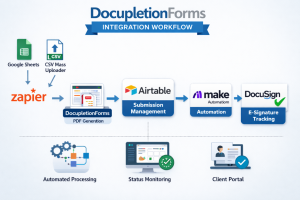
Google Sheets (or CSV uploader), Zapier, DocupletionForms Data-Merge PDF, AirTable, Make, DocuSign!

The DocupletionForms Integration Architecture outlines a structured, end-to-end workflow that connects Google Sheets, Zapier, DocupletionForms, Airtable, Make.com, and DocuSign into a unified document automation system. A submission can originate either from a new Google Sheets row (triggered via Zapier) or from the built-in CSV Mass Uploader inside DocupletionForms for batch processing. Once triggered, DocupletionForms performs conditional logic processing and PDF data-merging, generating structured document outputs ready for signature workflows.

From there, Airtable serves as the orchestration hub and state-management engine. Every submission is logged, scheduled, batched, and tracked using controlled status fields that prevent automation conflicts. Airtable determines when a submission is ready for downstream processing and securely triggers Make.com, which acts as the execution engine for document finalization and DocuSign envelope creation. This architecture ensures precise timing control, audit visibility, and scalable workflow coordination across multiple systems.

Make.com then monitors the DocuSign signing process and feeds real-time status updates back into Airtable, where operational dashboards and client portals reflect completion progress. The result is a scalable integration framework that supports single submissions or bulk client uploads while maintaining full audit traceability and workflow integrity. You can download the complete architectural breakdown here:

DocupletionForms Integration Architecture (PDF)

1 2