How to Use a PDF Intake Encoding SOP to Turn Any Fillable PDF into a Question-Based Workflow
Fillable PDFs are everywhere in professional work. Law firms, accountants, consultants,
schools, nonprofits, and businesses all rely on them to collect information from clients,
staff, or the public. Yet despite being “fillable,” most PDFs are still difficult to use
efficiently.
People type into the wrong boxes. Important fields are missed. The same information is
entered multiple times. And when PDFs are handed off to others, there is rarely a clear,
repeatable process for turning those documents into structured, question-based forms.
This is exactly the problem the PDF Intake Question Encoding SOP is designed
to solve.
This article explains what the SOP is, what it allows you to do, and how people can use it
to reliably create questions that correctly fill out the fields of any uploaded fillable PDF.
What Is the PDF Intake Question Encoding SOP?
The PDF Intake Question Encoding SOP is a short, printable instruction document. Its sole
purpose is to explain how to create questions that correctly populate a fillable PDF.
It is not software. It is not a technical manual. It does not require programming knowledge.
Instead, it acts as a clear set of rules and steps that can be followed by:
- Staff members
- Encoders or form builders
- Consultants
- Clients
- Or even AI assistants
When the SOP is uploaded into an AI Chat like ChatGPT alongside a fillable PDF, it provides all the guidance needed to
determine:
- What questions should be asked
- What each question should say
- What type of answer each question should collect
- Which PDF field each answer should fill
In other words, it turns a static document into a structured intake process.
The Core Problem with Fillable PDFs
Although fillable PDFs look simple on the surface, they hide several challenges:
- Field labels are often unclear or inconsistent
- Some fields look similar but serve different purposes
- Users don’t know what information belongs in which box
- Different people interpret the same PDF differently
This leads to errors, back-and-forth communication, and wasted time.
The SOP solves this by shifting the focus away from “filling boxes” and toward
asking the right questions.
The Key Principle: Questions Collect Meaning
The SOP is built around one simple idea:
Questions collect meaning. PDF fields receive meaning. Mapping connects the two.
A question is written to capture a specific piece of information. A PDF field is simply a
destination where that information should appear. The SOP teaches users how to connect those
two things correctly and consistently.
How the SOP Is Used in Practice
Using the SOP follows a straightforward process.
Step 1: Upload the Fillable PDF
Start by uploading the fillable PDF you want to work with. This could be a client intake form,
an application, a disclosure, or any other document with fillable fields.
Step 2: Review the PDF Visually
Open the PDF and read it carefully:
- Go from top to bottom
- Move left to right
- Identify every box that expects information
This step ensures that no field is overlooked.
Step 3: Identify the PDF Field Names
Every fillable box in a PDF has a field name. These names are what determine where answers
will appear in the document.
The SOP instructs users to rely on the field names exactly as they are shown when mapping
answers to the PDF.
Examples of field names include:
- LAST NAME
- DATE OF BIRTH
- CURRENT RESIDENTIAL ADDRESS
These names are treated as authoritative.
Writing Questions That Match the PDF
Once the PDF fields are identified, the next step is to write questions that match them
by meaning.
The SOP makes an important distinction:
- The wording of the question does not need to match the field name
- The meaning of the question must match exactly
For example:
PDF Field Name: DATE OF BIRTH
Question: What is the client’s date of birth?
Different wording, same meaning.
Choosing the Right Question Type
The SOP also explains how to choose the appropriate type of question based on the kind of
information being collected.
- Short text for names and identifiers
- Paragraph text for explanations or descriptions
- Phone fields for phone numbers
- Email fields for email addresses
This improves usability while keeping the PDF output correct.
Adding Help Text to Reduce Errors
Help text is optional, but strongly recommended.
The SOP encourages adding brief instructions beneath each question to explain:
- Formatting expectations
- What information is required
- What to include or exclude
This reduces mistakes and follow-up questions.
Verifying That the PDF Fills Correctly
The final step is verification.
- Enter sample answers
- Generate the completed PDF
- Confirm each answer appears in the correct box
If something appears in the wrong place, the mapping is adjusted until it is correct.
Why This SOP Is So Powerful
The PDF Intake Question Encoding SOP creates consistency.
Instead of each person inventing their own way of “figuring out” a PDF, everyone follows
the same clear process. This makes it possible to:
- Train staff quickly
- Delegate encoding work confidently
- Reuse the process across many PDFs
- Reduce errors and rework
Most importantly, it transforms PDFs from static documents into reliable, structured workflows.
Who This Is For
This SOP is useful for anyone who regularly works with fillable PDFs, including:
- Professional service firms
- Administrative teams
- Consultants and implementers
- Organizations onboarding new clients
- Anyone responsible for document intake
Final Takeaway
Fillable PDFs don’t have to be confusing or inconsistent.
With the PDF Intake Question Encoding SOP, you can clearly explain how to turn any PDF into
a set of well-written questions that reliably fill the correct fields every time.
Upload the SOP. Upload the PDF. Follow the steps. The rest takes care of itself.

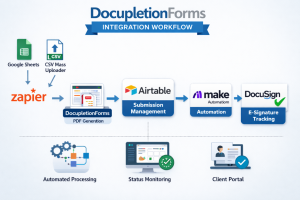


 THIS IS HUGE! Checkboxes have been historically difficult! Our new release inside of DocupletionForms.com is the ability to check multiple checkboxes at one time with one condition and/or any multiple set of conditions or group of conditions paired with other group conditions. You can also set the minimum and/or maximum number of checkboxes that will be checked inside of the PDF from the FormBuilder itself. This is a simple release note and we are going to be working on more instructions and examples. The way it did function inside of DocupletionForms.com was that you could only use the checkbox utility in the form and it would only check one checkbox at a time. Now you can trigger a checkbox to be checked in a PDF by any combination of conditions that a form submission presents. It is possible from time to time that the PDF you are attmepting to automate will not allow inputs from outside programs via embedded programming in their meta data. This is an issue no matter what and you have to become a PDF expert and flatten the PDF and then make your own fill-in-the-blanks, which is outside the scope of our program. We work on California Judicial Council Forms and they tend to be the most difficult types of documents in general across all industries, but as such, any other PDF Document tends to be much easier to automate!