
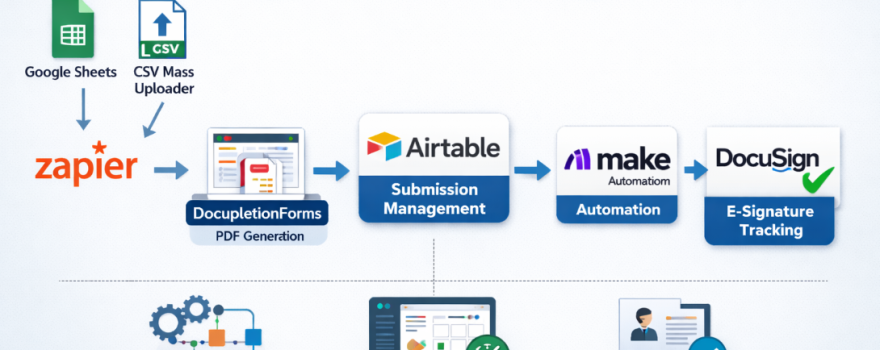



Automated Client Workflow
- Conditional Intake Forms:
Build dynamic, multi-step intake forms that adapt in real time based on how users answer each question. Instead of presenting a long static questionnaire, forms guide users through a logical decision path that reflects real-world scenarios. By applying conditional logic rules, irrelevant fields are hidden automatically, which reduces user fatigue and prevents incomplete or inaccurate submissions. For complex workflows involving multiple branching paths, advanced logic structures are fully documented in the Rule Builder guide.
- PDF Document Automation & Data-Merge:
Once form data is collected, it can be mapped directly to PDF templates so documents are generated automatically. This eliminates manual copy-and-paste work and ensures every document follows a consistent structure. Getting started is straightforward using the Data-Merge Basic Instructions, while more advanced use cases—such as conditional field population and multi-template workflows—are covered in the GitBook data-merge documentation.
- Checkbox & Conditional Field Triggers:
Form checkboxes can be synchronized directly with checkbox fields inside generated PDF documents. This is especially useful for agreements, compliance checklists, elections, and option-based disclosures where selections drive document content. The complete setup process is explained in the Checkboxes on Form Trigger Checkboxes on PDF walkthrough, with deeper technical reference material available in the GitBook reference.
- Automated Email Delivery:
Completed documents can be delivered instantly to clients, internal teams, or external partners upon form submission. This removes the need for manual attachment handling and follow-up emails. Delivery rules, recipients, and message templates are controlled using built-in form settings described in the confirmation and notification instructions, ensuring documents reach the correct recipients at the correct stage of the workflow.
- Zapier & App Integrations:
Form submissions can be connected to thousands of external applications including Google Sheets, Slack, CRMs, and email platforms. This allows workflow data to flow seamlessly into the tools teams already use. Basic integrations can be implemented using the Zapier setup guides, while more advanced automation scenarios—such as PDF-driven triggers—are documented in the Zapier PDF merge documentation.
- Webhooks & External System Routing:
For custom integrations, submission data can be sent directly to external systems using webhooks. Common use cases include CRM ingestion, database storage, or server-side processing via PHP or MySQL. Implementation examples are outlined in the webhook instructions, with additional architectural guidance in the GitBook Webhooks Add-on documentation.
- URL Forwarding & Data Appends:
After submission, users can be redirected to another page while selected form values are passed securely via URL parameters. This technique is commonly used for custom dashboards, portals, or third-party handoffs. Detailed configuration steps are provided in the Append Data to a URL Forward guide.
- QR-Code Enabled Form Access:
QR codes can be generated to provide instant access to forms in physical locations or printed materials. This is particularly useful for events, offices, job sites, or mobile-first workflows. Setup instructions and examples are available in the QR Code for Contact Forms guide.
- Enterprise Roles & Organization Management:
Access control and workflow ownership can be managed across teams and departments using role-based permissions. This ensures sensitive data and administrative controls are limited to authorized users. Enterprise-level options are explained in the Enterprise Subscription Organization Roles overview and expanded further in the GitBook enterprise documentation.
- How to Use a PDF Intake Encoding SOP to Turn Any Fillable PDF into a Question-Based Workflow:
This guide walks you through how to take a traditional fillable PDF and transform it into a dynamic, question-based intake form that feels conversational and user-friendly. It explains why converting static PDFs into interactive question sequences can streamline data collection, reduce friction for respondents, and improve completion rates for your workflows. Whether you’re onboarding clients, collecting applications, or gathering information, the post shows how a more guided intake experience boosts both efficiency and accuracy.