One Intake, the Whole Set of Service Documents: A Process-Serving Integration Playbook

For the integrators who connect the stack, the affiliates who resell it, and the process servers who are quietly both.

A single process-serving intake can generate the entire conditional set of affidavits and declarations a case needs — the right documents selected by service outcome, merged automatically, and pushed back into the tools you already use. Not chosen by a model guessing at the rules, but by deterministic logic that produces the same set every time. For an integrator, that’s a missing puzzle piece you can resell instead of build. For a process server, it’s the back-office afternoon you get to keep. And if you’re both, it’s a recurring affiliate line on work you were already doing.

Process serving is a document-multiplication problem

One case rarely means one document. A single service event branches by the named parties and by the outcome — personal service, substituted service, posting and mailing, or non-service after diligent attempts — and each branch calls for a different affidavit or declaration, sometimes a small stack of them. Layer in jurisdiction-specific forms and the math gets steep fast.

The shape of the problem: a contested service with three named parties and four documented outcomes can fan out into more than a dozen valid document configurations — and the server still has to pick the correct one, fill it correctly, and file it before a deadline.

That picking-and-filling step is exactly the kind of repetitive, rule-bound work that should never depend on memory or a rushed afternoon.

The conditional set, selected by outcome

The reliable way to handle that branching is to encode it as rules, not judgment calls. The service outcome drives the document set:

  • Served personally → affidavit of personal service.
  • Substituted service → substituted-service affidavit plus the supporting declaration of diligence.
  • Posted and mailed → affidavit of posting plus the mailing declaration.
  • Not served → non-service affidavit plus the declaration of due diligence documenting every attempt.

The rules live inside the platform. Feed the same case and the same outcome and you get the same set, in the same order, with the same fields populated — today, next month, and on the case you’d forgotten about.

How the flow works today

This is shipping now, across the connection points integrators already wire up. The flow is the same whether the intake arrives from a form, a webhook, or Salesforce:

1

Capture the intake. A single form submission — or data pushed in from your client’s platform through a bidirectional webhook or the Salesforce ISV connector.

2

Apply the rules. DocupletionForms reads the outcome and case fields and deterministically selects the document set. No Apex, no managed-package development, no custom merge logic to maintain.

3

Merge. A data-merge populates each selected document from the intake fields.

4

Return. Finished documents and structured metadata go back out to the platform that started it — written into Salesforce as files, returned over the webhook, or fanned out through Zapier.

The sharpest version most integrators don’t realize is possible: pull a Salesforce custom object in through Zapier, run the deterministic multi-document merge on its fields, and send the finished set back into Salesforce — no Apex and no managed package anywhere in the chain.

Why deterministic, not AI — and why that’s the selling point

A wrong affidavit isn’t a typo. It’s a defective proof that can get service quashed or blow a filing deadline, with the liability landing on the professional who signed it. “Set it and forget it” only means something if identical inputs produce identical output every single time.

Rule-based selection can promise exactly that. A generative model, by design, cannot — variability is the feature everywhere except here. That’s not a knock on AI; it’s the honest line that lets an integrator stake their reputation on the recommendation, and lets a server stop re-checking the set the night before a filing. Determinism is the risk reduction the professional is actually paying for.

The integrator and affiliate angle

If you connect client stacks for a living, documents are usually the brittle last mile — the part you hand-build and then quietly own forever. There’s a cleaner move:

  • Resell, don’t build. Drop the deterministic document layer into the middle of a stack you’ve already sold, instead of maintaining fragile merge logic yourself.
  • Earn recurring revenue. Every client you bring runs through the partner program, so it’s a recurring line rather than a one-time setup fee.
  • Skip the support tail. Because selection is deterministic, there’s no “why did it grab the wrong form this time” ticket for you to inherit.

And the crossover: plenty of process servers already wire up their own Zapier zaps and webhooks. If that’s you, the same setup that buys back your afternoons can pay you as an affiliate when you stand it up for the firm down the street. Server who integrates, integrator who serves — either way, the document layer is the part worth owning.

Put the document vertex in your stack

Try it on a real intake, or resell it to the clients you already serve.

Start a free trial
Apply to the partner program

Frequently asked questions

Do I need Apex or a managed package to generate documents from Salesforce?

No. The Salesforce path runs through the ISV connector or Zapier, and the selection and merge happen inside DocupletionForms — including for custom objects.

How does the system know which affidavit to use?

Rule-based selection keyed to the service outcome and case fields. The same inputs always produce the same document set.

Is the document selection done by AI?

No. It’s deterministic and rule-based by design — which is what makes it dependable for documents that carry legal consequence.

Which platforms can it connect to today?

Salesforce via the ISV connector, Zapier, and any platform through bidirectional webhooks — data in, finished documents and metadata back out.

How do affiliates get paid?

Through the partner program, on a recurring basis for the clients you bring. Apply through the partner page to get your link.

JP

James Polk — Founder & COO, DocupletionForms

James was formerly a San Diego County Legal Document Assistant and now builds deterministic, rule-based document automation for the professionals — and the integrators who serve them — who can’t afford to send the wrong document.

Related: real-estate document automation for transaction coordinators · become an integration partner.
The Last-Mile Problem in Workflow Automation: Turning Connected Data into the Right Documents

The modern stack is fully connected — until it has to produce the actual documents. That gap is the last mile, and it’s why a deterministic document layer belongs in the middle of your stack.

Across the modern stack, data already flows freely — CRMs, intake forms, and automation tools all talk to each other. The last mile that stays brittle is turning that connected data into the correct set of finished documents, reliably, every time. That gap is what a deterministic document layer — a “document vertex” that ingests data, selects the right documents by rule, and pushes them back out — is built to close. Generic tools handle the plumbing; they don’t reliably handle conditional multi-document selection. That distinction is what this post is about.

The stack is connected — the documents are not

Zapier moves records between apps, CRMs sync with forms, and webhooks fire on every event. Connecting systems is largely a solved problem. What stays unsolved is the moment that data has to become a specific, correct set of documents — an affidavit set, a disclosure packet, a formation bundle — chosen by the particulars of the case. That step still gets hand-built, and it’s where automation projects quietly break.

Why the last mile breaks

  • Conditional selection is hard. The right set depends on many input combinations; generic merge tools are built to fill one template at a time, not to choose among many by rule.
  • Variability is unacceptable here. A wrong document isn’t a cosmetic glitch — in regulated work it’s a rejected filing or a liability.
  • It gets owned forever. Hand-built merge logic becomes the fragile thing someone has to maintain.

The document vertex: a deterministic layer in the middle

Think of it as a vertex in your stack — a point that connects to everything around it. Data comes in from whatever the client already uses: a form, Zapier, a webhook, or Salesforce. Rules select the correct document set. Finished documents and metadata go back out to those same platforms. Because the selection is deterministic — the same inputs always yield the same set — it behaves like infrastructure rather than a wildcard.

The shape of the gap: most automation stacks can connect a dozen apps without a line of code, yet still can’t reliably answer one question — given this record, exactly which documents should exist? That question is the last mile.

Why deterministic, not AI

A document layer that improvises is a document layer you can’t trust with consequence. Rule-based selection makes the same decision every time, which is the only thing that turns “set it and forget it” from a slogan into a guarantee. A generative model can’t promise identical output for identical input — that’s by design — which is exactly why it doesn’t belong at the point where the documents have to be right.

Where this is going

The direction is straightforward: a deterministic document layer that more of the tools you already use can plug into over time, so the right documents become a dependable part of any workflow rather than the brittle end of it. The plumbing is solved; the document vertex is what makes the output trustworthy.

Put a deterministic document layer in your stack

See how the document vertex drops into a stack you’ve already built.

Start a free trial
Become an integration partner

Frequently asked questions

What is document automation middleware?

A layer that sits between your data sources and your finished documents: it ingests data, selects and merges the right documents by rule, and returns them to your stack.

Why can’t a generic automation tool handle the documents?

Generic tools excel at moving data and filling a single template. Conditional multi-document selection — choosing the correct set from many possibilities by rule — is a different problem they aren’t built to do reliably.

What does “deterministic” mean here?

The same inputs always produce the same document set, with no variability — the property that makes the output trustworthy for work that carries consequence.

How does it connect to what I already use?

Through Zapier, bidirectional webhooks, and the Salesforce ISV connector today.

JP

James Polk — Founder & COO, DocupletionForms

James was formerly a San Diego County Legal Document Assistant and now builds deterministic, rule-based document automation for the professionals — and the integrators who serve them — who can’t afford to send the wrong document.

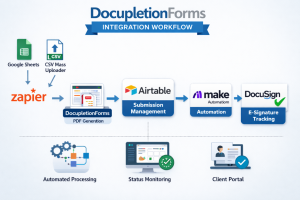
Google Sheets (or CSV uploader), Zapier, DocupletionForms Data-Merge PDF, AirTable, Make, DocuSign!

The DocupletionForms Integration Architecture outlines a structured, end-to-end workflow that connects Google Sheets, Zapier, DocupletionForms, Airtable, Make.com, and DocuSign into a unified document automation system. A submission can originate either from a new Google Sheets row (triggered via Zapier) or from the built-in CSV Mass Uploader inside DocupletionForms for batch processing. Once triggered, DocupletionForms performs conditional logic processing and PDF data-merging, generating structured document outputs ready for signature workflows.

From there, Airtable serves as the orchestration hub and state-management engine. Every submission is logged, scheduled, batched, and tracked using controlled status fields that prevent automation conflicts. Airtable determines when a submission is ready for downstream processing and securely triggers Make.com, which acts as the execution engine for document finalization and DocuSign envelope creation. This architecture ensures precise timing control, audit visibility, and scalable workflow coordination across multiple systems.

Make.com then monitors the DocuSign signing process and feeds real-time status updates back into Airtable, where operational dashboards and client portals reflect completion progress. The result is a scalable integration framework that supports single submissions or bulk client uploads while maintaining full audit traceability and workflow integrity. You can download the complete architectural breakdown here:

DocupletionForms Integration Architecture (PDF)

DocupletionForms Zapier Integration V1.4 Update COMPLETE!


DocupletionForms Zapier Integration – Version 1.4

Officially Promoted on Zapier

Version 1.4 is now live and publicly approved by Zapier.
After full draft testing, the integration has been successfully promoted and is production-ready.

What Version 1.4 Enables

With DocupletionForms v1.4, you can:

  • Send data from any Zapier-supported application
  • Map that data to a DocupletionForms form
  • Automatically merge the data into one or multiple PDF documents
  • Deliver the generated PDF via email or downstream Zapier automation
Automation Flow:
Any App → Zapier → DocupletionForms → Data-Merged PDF → Anywhere

How the Workflow Works

Example: Google Sheets → Automated PDF

  1. A new row is added in Google Sheets
  2. Zapier triggers
  3. Zap sends the sheet data to DocupletionForms
  4. Form fields are mapped to incoming data
  5. Internal Data-Merge maps form fields to PDF fields
  6. PDF is generated automatically
  7. The PDF is emailed or sent through additional Zap steps

The original data can also continue downstream in Zapier.

Core Value Proposition

Middleware Integration-as-a-Service

Instead of building custom PDF engines or backend automation pipelines, you simply:

  • Map fields
  • Configure merge settings
  • Connect through Zapier
  • Automate document output

No custom code required.

Why This Is Powerful

Most automation tools move data. Few can:

  • Convert structured data into properly formatted PDFs
  • Support internal conditional logic
  • Handle multi-document merges
  • Distribute documents through multiple delivery paths

Version 1.4 delivers stable, production-ready PDF automation inside Zapier.

Ideal Use Cases

  • Legal document automation
  • Contract generation workflows
  • Government or nonprofit form processing
  • SaaS platforms needing PDF generation
  • HR onboarding packets
  • Insurance documentation
  • Real estate contracts
  • Compliance or structured documentation pipelines

What’s New in v1.4

  • Officially promoted to Public by Zapier
  • Improved stability after draft testing
  • Enhanced data handling in Zap-based submissions
  • Reliable downstream Zap continuation
  • Production-ready PDF merge workflows

Architecture Overview

External App

Zapier Trigger

DocupletionForms Form Submission

Internal Field Mapping

PDF Data-Merge Engine

Email or Zapier Output

Reliability & Approval

Version 1.4 has been:

  • Fully tested in draft mode
  • Approved and promoted by Zapier
  • Verified for public production use

Get Started

  1. Create a Zap
  2. Select your trigger app
  3. Choose DocupletionForms
  4. Map your fields
  5. Configure your PDF merge
  6. Test and activate

You now have fully automated document generation.


How to Turn a Fillable PDF into a Question-Based Intake Form

How to Use a PDF Intake Encoding SOP to Turn Any Fillable PDF into a Question-Based Workflow

Fillable PDFs are everywhere in professional work. Law firms, accountants, consultants,
schools, nonprofits, and businesses all rely on them to collect information from clients,
staff, or the public. Yet despite being “fillable,” most PDFs are still difficult to use
efficiently.

People type into the wrong boxes. Important fields are missed. The same information is
entered multiple times. And when PDFs are handed off to others, there is rarely a clear,
repeatable process for turning those documents into structured, question-based forms.

This is exactly the problem the PDF Intake Question Encoding SOP is designed
to solve.

This article explains what the SOP is, what it allows you to do, and how people can use it
to reliably create questions that correctly fill out the fields of any uploaded fillable PDF.


What Is the PDF Intake Question Encoding SOP?

The PDF Intake Question Encoding SOP is a short, printable instruction document. Its sole
purpose is to explain how to create questions that correctly populate a fillable PDF.

It is not software. It is not a technical manual. It does not require programming knowledge.
Instead, it acts as a clear set of rules and steps that can be followed by:

  • Staff members
  • Encoders or form builders
  • Consultants
  • Clients
  • Or even AI assistants

When the SOP is uploaded into an AI Chat like ChatGPT alongside a fillable PDF, it provides all the guidance needed to
determine:

  • What questions should be asked
  • What each question should say
  • What type of answer each question should collect
  • Which PDF field each answer should fill

In other words, it turns a static document into a structured intake process.


The Core Problem with Fillable PDFs

Although fillable PDFs look simple on the surface, they hide several challenges:

  • Field labels are often unclear or inconsistent
  • Some fields look similar but serve different purposes
  • Users don’t know what information belongs in which box
  • Different people interpret the same PDF differently

This leads to errors, back-and-forth communication, and wasted time.

The SOP solves this by shifting the focus away from “filling boxes” and toward
asking the right questions.


The Key Principle: Questions Collect Meaning

The SOP is built around one simple idea:

Questions collect meaning. PDF fields receive meaning. Mapping connects the two.

A question is written to capture a specific piece of information. A PDF field is simply a
destination where that information should appear. The SOP teaches users how to connect those
two things correctly and consistently.


How the SOP Is Used in Practice

Using the SOP follows a straightforward process.

Step 1: Upload the Fillable PDF

Start by uploading the fillable PDF you want to work with. This could be a client intake form,
an application, a disclosure, or any other document with fillable fields.

Step 2: Review the PDF Visually

Open the PDF and read it carefully:

  • Go from top to bottom
  • Move left to right
  • Identify every box that expects information

This step ensures that no field is overlooked.

Step 3: Identify the PDF Field Names

Every fillable box in a PDF has a field name. These names are what determine where answers
will appear in the document.

The SOP instructs users to rely on the field names exactly as they are shown when mapping
answers to the PDF.

Examples of field names include:

  • LAST NAME
  • DATE OF BIRTH
  • CURRENT RESIDENTIAL ADDRESS

These names are treated as authoritative.


Writing Questions That Match the PDF

Once the PDF fields are identified, the next step is to write questions that match them
by meaning.

The SOP makes an important distinction:

  • The wording of the question does not need to match the field name
  • The meaning of the question must match exactly

For example:

PDF Field Name: DATE OF BIRTH

Question: What is the client’s date of birth?

Different wording, same meaning.


Choosing the Right Question Type

The SOP also explains how to choose the appropriate type of question based on the kind of
information being collected.

  • Short text for names and identifiers
  • Paragraph text for explanations or descriptions
  • Phone fields for phone numbers
  • Email fields for email addresses

This improves usability while keeping the PDF output correct.


Adding Help Text to Reduce Errors

Help text is optional, but strongly recommended.

The SOP encourages adding brief instructions beneath each question to explain:

  • Formatting expectations
  • What information is required
  • What to include or exclude

This reduces mistakes and follow-up questions.


Verifying That the PDF Fills Correctly

The final step is verification.

  1. Enter sample answers
  2. Generate the completed PDF
  3. Confirm each answer appears in the correct box

If something appears in the wrong place, the mapping is adjusted until it is correct.


Why This SOP Is So Powerful

The PDF Intake Question Encoding SOP creates consistency.

Instead of each person inventing their own way of “figuring out” a PDF, everyone follows
the same clear process. This makes it possible to:

  • Train staff quickly
  • Delegate encoding work confidently
  • Reuse the process across many PDFs
  • Reduce errors and rework

Most importantly, it transforms PDFs from static documents into reliable, structured workflows.


Who This Is For

This SOP is useful for anyone who regularly works with fillable PDFs, including:

  • Professional service firms
  • Administrative teams
  • Consultants and implementers
  • Organizations onboarding new clients
  • Anyone responsible for document intake

Final Takeaway

Fillable PDFs don’t have to be confusing or inconsistent.

With the PDF Intake Question Encoding SOP, you can clearly explain how to turn any PDF into
a set of well-written questions that reliably fill the correct fields every time.

Upload the SOP. Upload the PDF. Follow the steps. The rest takes care of itself.

Enterprise Subscription Orgainization Roles!

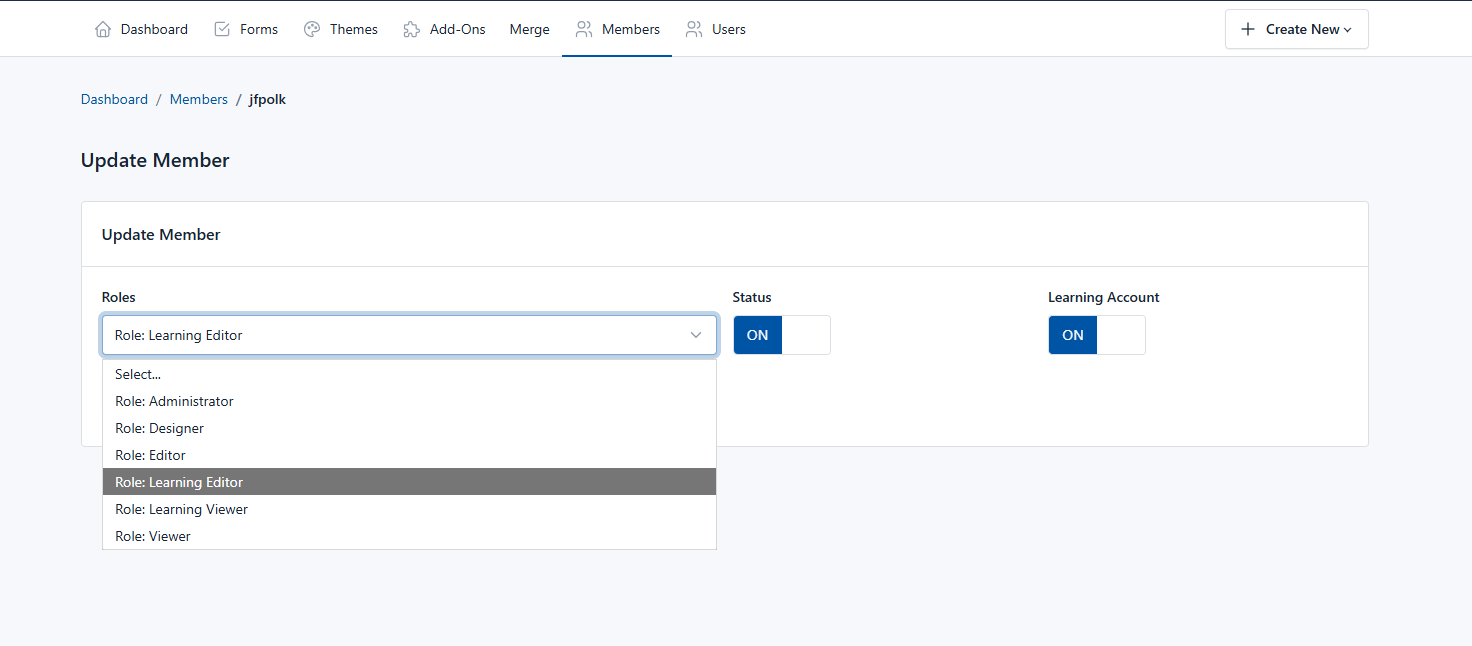
This is where the Organization roles for the $497 enterprise subscription are set for each subscription:
These are the Organization roles for the $497 enterprise subscription:
1. Owner: The one who pays the subscription. Has access to all:
– Manage subscription
– Configure organization
– Manage members
– Manage forms
– Manage entries
– Manage templates
– Manage themes
– Access add-ons
2. Administrator:
– Manage members
– Manage forms
– Manage entries
– Manage templates
– Manage themes
– Access add-ons
3. Designer:
– Manage forms
– Manage entries
– Manage templates
– Manage themes
– Access add-ons
4. Editor:
– View, configure, and publish forms
– Manage entries
– Manage templates
– Manage themes
5. Viewer:
– View forms
– Manage entries
6. Learning Editor:
– Manage Own Forms
– Manage Own Templates
– Manage Own Themes
7. Learning Viewer:
– Manage Own Forms
So, Owners and Administrators can assign user roles to the Organization members to grant access: admin, designer, editor, learning accounts.
Note: When the owner/admin deletes a member, the member is not deleted from the system. The only thing that is deleted is the member access to the organization. Allowing the owner to re-invite the same user to the organization without any problem.

Checking PDF Checkboxes via Multiple Conditions!

THIS IS HUGE!  Checkboxes have been historically difficult!  Our new release inside of DocupletionForms.com is the ability to check multiple checkboxes at one time with one condition and/or any multiple set of conditions or group of conditions paired with other group conditions.  You can also set the minimum and/or maximum number of checkboxes that will be checked inside of the PDF from the FormBuilder itself.  This is a simple release note and we are going to be working on more instructions and examples.  The way it did function inside of DocupletionForms.com was that you could only use the checkbox utility in the form and it would only check one checkbox at a time.  Now you can trigger a checkbox to be checked in a PDF by any combination of conditions that a form submission presents.  It is possible from time to time that the PDF you are attmepting to automate will not allow inputs from outside programs via embedded programming in their meta data.  This is an issue no matter what and you have to become a PDF expert and flatten the PDF and then make your own fill-in-the-blanks, which is outside the scope of our program.  We work on California Judicial Council Forms and they tend to be the most difficult types of documents in general across all industries, but as such, any other PDF Document tends to be much easier to automate!
Simplifying Document Automation: How DocupletionForms.com Offers Powerful, No-Code Tools for Your Workflow

If you’re looking for a streamlined way to create and manage documents without needing to write a single line of code, DocupletionForms.com offers a powerful alternative to other document automation platforms like Formstack Documents. Our platform is built for professionals, small businesses, and organizations that want to automate paperwork with ease and flexibility — without sacrificing control or customization.

No-Code Document Automation, Built for You

DocupletionForms.com makes it easy to create automated document workflows using simple, conditional logic forms. You don’t need programming skills or IT support. Whether you’re assembling client agreements, intake forms, contracts, or recurring business documents, our system lets you build smart workflows that auto-populate your PDF templates and deliver them in seconds.

Dynamic Templates with Conditional Logic

Our platform supports robust template logic that responds to user input. This means your documents can change dynamically — whether it’s showing or hiding entire sections, filling in variable data, or formatting content based on form responses. This flexibility allows you to deliver professional, accurate documents tailored to each individual or case.

Data Integration for Seamless Automation

DocupletionForms.com allows you to connect form data directly to pre-formatted PDF templates. You can pull in data from your users, clients, or staff via custom forms and generate fully filled documents instantly. This eliminates manual copy-paste work, reduces human error, and saves countless hours of admin time.

Secure and Professional Document Handling

Security and professionalism are baked into every part of DocupletionForms.com. Documents are generated on demand through secure workflows, ready for download, email, or storage. Whether you’re using the system internally or delivering documents to clients, the process is efficient and polished.

Perfect for Business, Legal, Education, and Nonprofits

From small firms to volunteer-based nonprofits, DocupletionForms.com is adaptable for any use case involving repeatable document tasks. Legal intake forms, employment packets, school enrollment paperwork, nonprofit agreements — our platform handles them all with speed and consistency.

Try It Today

If you’re seeking a cost-effective, powerful way to automate document creation and reduce paperwork stress, explore DocupletionForms.com. Whether you’re transitioning from spreadsheets and manual editing or comparing platforms like Formstack Documents, you’ll find that our solution offers the essential tools you need — without complexity or clutter.

Checkout cPanel’s Blog

Our 50GB Hosting is 50GB on your own cPanel, and therefore we think you might find the cPanel Blog interesting.  cPanel is something we initially offered simply so that you could host your own HTML files inside of the File Manager, but there are so many other things you can do with cPanel.  Checkout the cPanel Blog, and also, checkout our 50GB WordPress hosting on your own cPanel for $20/mo.

As always, if you want to learn more about WordPress Security, Checkout our growing list of videos you can access for FREE!  We purchased a license from a professional group to use their videos on WordPress Security on our site and the license requires us to charge money, so we set the price low at $1.

Make sure to take a look at our new Training Facebook Page: “Professional Document Automation & Integration Master’s Clinic Workshop” where we post daily content aimed at helping you as a Legal Document Related Industry Professional.

And of course we still have our Main Facebook Page.

conditional logic url forward matrix form

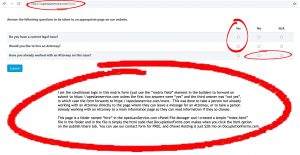
I set the conditional logic in this matrix form https://apexlawservice.com/hire (just use the “matrix field” element in the builder) to forward on submit to https://apexlawservice.com unless the first two answers were “yes” and the third answer was “not yes”, in which case the form forwards to https://apexlawservice.com/more.  This was done to take a person not already
working with an Attorney directly to the page where they can leave a message for an Attorney, or to take a person  already working with an Attorney to a main information page so they can read information if they so choose.
This page is a folder named “hire” in the ApexLawService.com cPanel File Manager and I created a simple “index.html” file in the folder and in the file is simply the html code that DocupletionForms.com makes when you click the html option on the publish/share tab. You can use our contact form for FREE.
1 2 3 4 5